If you play in an orchestra, sing in a choir or take lessons, you can easily end up carrying several kilos of paper. A tablet replaces that pile: all your music is with you, markings never get lost, and your foot can turn the pages. Here’s what matters when you make the switch.
Which iPad is best for sheet music?
Screen size is what counts. An A4 or letter-size page is roughly 28–30 cm (11–12 inches) tall.
- 13-inch (iPad Pro or iPad Air 13"): the page appears at almost its original size. It’s the best choice for orchestral parts and small engraving, especially on a music stand at some distance.
- 11-inch: the page is scaled down a little. For piano, choir or solo repertoire that is usually fine, and the device is lighter.
- iPhone: handy for looking something up, practising on the go or lead sheets, but too small to replace the music stand.
An Apple Pencil isn’t required, but it makes markings far more precise than a finger.
How do the scores get onto the iPad?
- Existing PDFs such as purchased editions or files from a publisher simply go into a folder in the Files app.
- Paper scores can be photographed with the camera. Use even lighting and shoot as straight from above as possible. Notenbuch combines several pages into one PDF automatically.
- Public-domain scores are available free of charge from IMSLP or the Mutopia Project. Our guide IMSLP scores on your iPad shows how.
A note on copyright: The rules for copying and scanning sheet music vary by country and are often stricter than for other media. Scanning public-domain works is fine; for works still under copyright, many publishers sell digital editions.
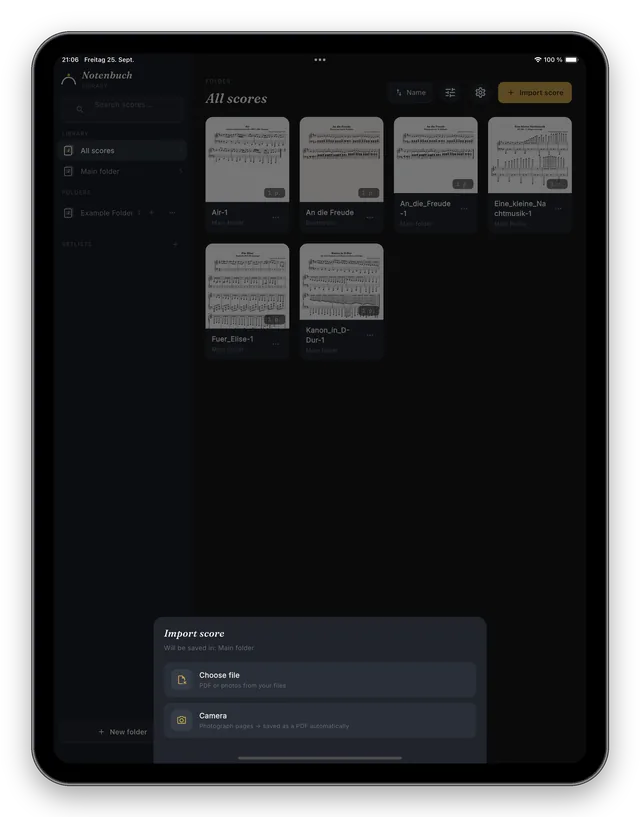
Organisation that still works a year from now
A tablet full of files called “Scan_0042.pdf” helps nobody. Two rules have proven themselves:
- Consistent file names, for example “Composer – Title – Part”, such as “Dvořák – Symphony 9 – Violin 2.pdf”.
- Folders that match how you play: by ensemble, concert programme or instrument. For a specific concert a setlist is often more practical than a folder, because the same piece can appear in several setlists.
Ideally, keep your scores in iCloud Drive. They are backed up automatically and available on iPhone, iPad and Mac.
Hands-free page turns
The biggest advantage over paper is turning pages with your foot. Bluetooth pedals such as AirTurn, PageFlip or iRig BlueTurn connect to the iPad like a keyboard and send arrow keys. Notenbuch understands these signals and turns forward or back – even past the end of a piece to the next one in your setlist.
Checklist for rehearsals and concerts
- Turn off or extend Auto-Lock (Settings → Display & Brightness) so the screen doesn’t go dark mid-movement.
- Turn on Do Not Disturb or a Focus so no notifications pop up over your music.
- Charge the battery beforehand and bring a charger for long services.
- Use dark mode in the pit or on stage and light mode in daylight.
- A sturdy music stand mount keeps the tablet from tipping over.
Conclusion
Switching pays off most if you carry a lot of music, mark up your parts often or want to turn pages with your foot. Start with the pieces you’re practising now and digitise the rest bit by bit. After a few weeks you won’t want the paper binder back.