The International Music Score Library Project (IMSLP), also known as the Petrucci Music Library, is the largest free sheet music collection on the web. It holds hundreds of thousands of scores and parts, mostly of works whose copyright has expired. Here’s how to get them onto your iPad.
First: copyright
Whether a work is free depends on the country. In the EU, copyright usually expires 70 years after the composer’s death; other countries use different terms. An edition (editor, arrangement) can also carry its own rights. IMSLP shows copyright information for every file – when in doubt, only download files marked as public domain in your country.
Step by step
- Open imslp.org in Safari and search for a composer or work, e.g. “Beethoven Für Elise”.
- Choose the right file. There are usually several editions. “Full Score” is the complete score; under “Parts” you’ll find individual parts. Check the page count and scan quality in the preview.
- Download. Tap the file and confirm the notice. Without a membership, IMSLP may show a short waiting time before the download.
- Save to Files. The PDF opens in Safari. Tap the share icon and choose “Save to Files”, then pick your score folder – the piece shows up in Notenbuch right away.
- Or import it in Notenbuch: tap “Import score” → “Choose file” and select the PDF from your Downloads folder.
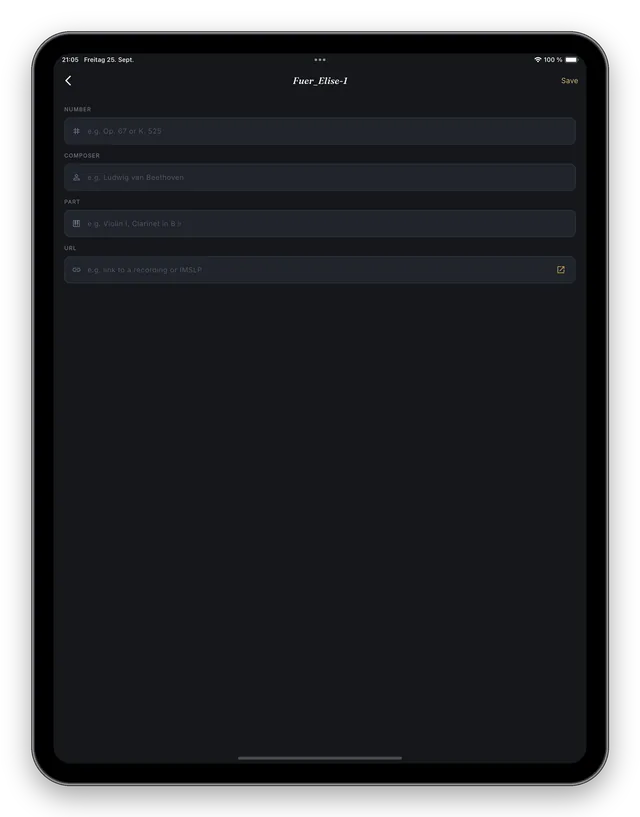
Tip: keep the source in the score details
For every piece, Notenbuch lets you store the composer, opus number, part and a link. Paste the address of the IMSLP page there, and you’ll quickly find another edition or a missing part later.
More sources for free sheet music
- Mutopia Project: a smaller selection, but newly engraved, very readable editions that can usually be shared freely.
- Choral libraries such as the Choral Public Domain Library (CPDL) for choral music.